How to Install a Laser Distance Sensor Correctly
مقدمة
Installing an industrial laser distance sensor requires more than mounting the device and connecting its power supply. Mechanical stability, optical alignment, target reflectivity, electrical compatibility, and environmental conditions all affect measurement reliability. Even a high-performance sensor may produce unstable readings when the installation does not match the application requirements.
Knowing how to position and configure the device is essential for engineers working with automated production lines, material handling equipment, industrial inspection systems, and precision positioning applications. This guide explains how to install a laser distance sensor correctly, from selecting the mounting position to verifying measurement performance under real operating conditions.
A مستشعر المسافة بالليزر Correctly installed and configured can provide consistent distance data for industrial monitoring and control. The following procedures help engineers avoid common installation mistakes and identify potential problems before commissioning.
1. Select the Correct Laser Distance Sensor Mounting Position
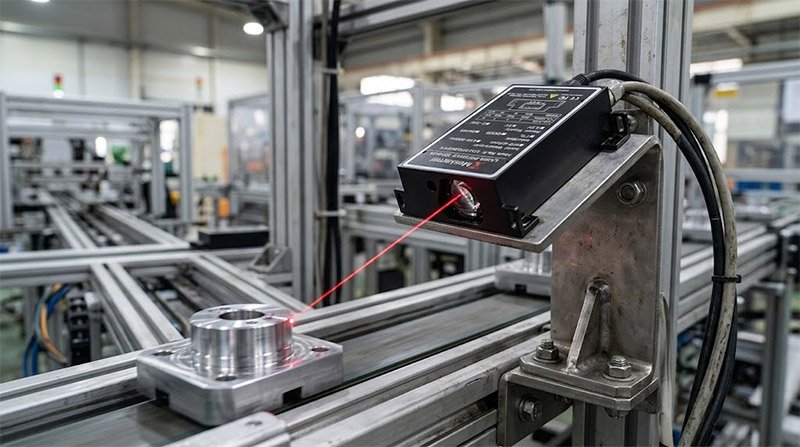
اختيار المناسب Laser Distance Sensor Mounting Position is the first step toward reliable measurement. Before fixing the sensor to a machine, confirm that the target remains within the specified measurement range throughout the complete operating cycle.
Consider these installation factors:
- Measurement range: Check the minimum and maximum distances required by the application.
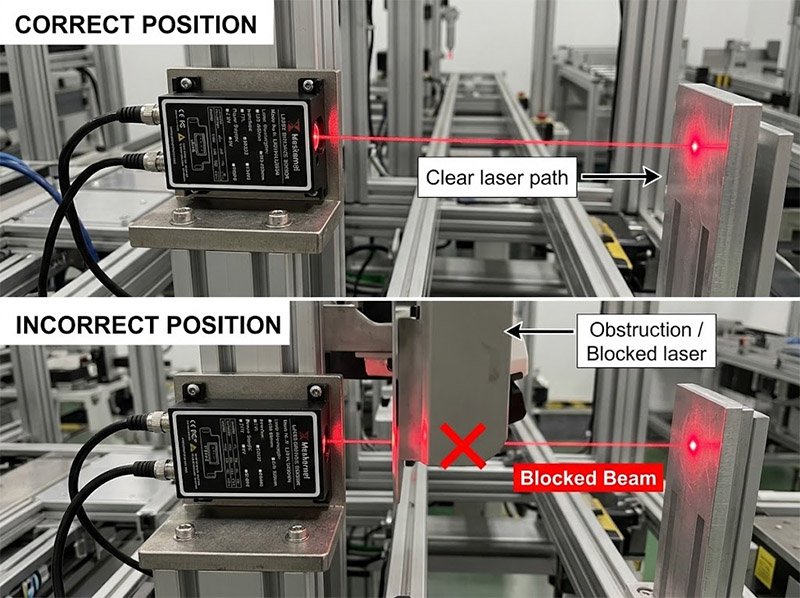
- Optical access: Keep the laser path clear of machine components, protective covers, and moving parts.
- Mechanical stability: Avoid mounting surfaces that flex or vibrate excessively.
- Environmental conditions: Evaluate dust, moisture, temperature variation, and ambient light.
- Maintenance access: Allow enough space for cable connections, cleaning, and future adjustments.
When determining the Laser Distance Sensor Mounting Position, consider the target’s full movement rather than its location at rest. A target that is correctly positioned during initial setup may move outside the measurement area when the machine operates.
A Laser Distance Sensor Correctly positioned relative to the target is less likely to experience intermittent readings caused by obstruction or misalignment. Engineers should also verify that the selected sensor model supports the required working distance and environmental conditions.
2. Secure the Sensor to a Stable Mounting Bracket
Mechanical stability directly influences measurement consistency. If the sensor bracket moves, the measured distance may fluctuate even when the target remains stationary.
Use a rigid bracket designed for the sensor’s weight and operating environment. Tighten the fasteners according to the manufacturer’s instructions, and avoid applying excessive force to the sensor housing.
For machines with significant vibration, reinforce the mounting structure where necessary. Any vibration isolation solution must preserve the positional stability required by the application.
To install a laser distance sensor correctly, check that the mounting surface is flat and that the housing is not twisted by uneven contact. Small mechanical deviations can become significant when measuring long distances or monitoring small positional changes.
After installation, inspect the fasteners again during commissioning. A Laser Distance Sensor Correctly secured at the beginning of a project should remain stable during normal machine operation.
3. Align the Laser Beam with the Target
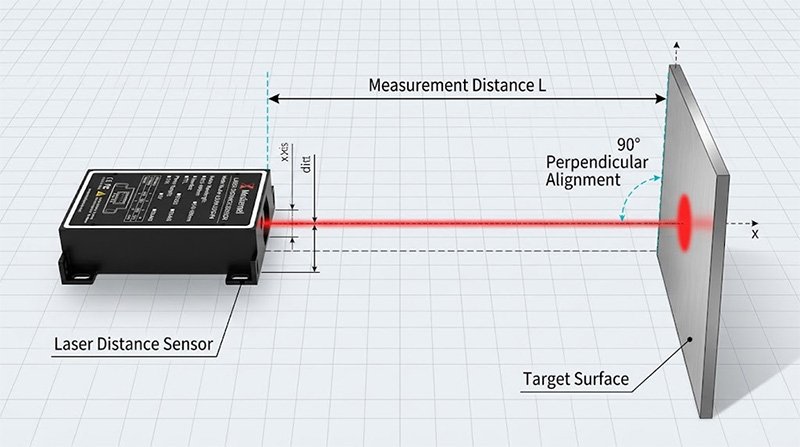
Optical alignment is another critical step in a Laser Distance Sensor Installation Guide. The laser spot must reach the intended target area, and the reflected light must return to the receiver in a form the sensor can process reliably.
Whenever the application permits, begin with the sensor approximately perpendicular to the target surface. However, the ideal angle depends on the sensor’s measurement principle and the surface being measured. Highly reflective or inclined targets may require a different arrangement.
Follow this procedure:
- Power on the sensor according to the manufacturer’s instructions.
- Confirm that the laser spot reaches the intended target.
- Verify that the target is within the specified operating range.
- Adjust the sensor position gradually while monitoring the readings.
- Tighten the mounting hardware after obtaining stable measurements.
بالنسبة لـ تطبيقات المسافات الطويلة, even a small angular deviation can move the laser spot considerably. Verify alignment at both the nearest and farthest expected measurement positions.
A Laser Distance Sensor Correctly aligned with its target can maintain more reliable readings, provided that the target surface and operating conditions are also suitable.
4. Evaluate Target Reflectivity and Surface Conditions
Target properties can significantly affect laser measurement performance. Color, reflectivity, texture, surface inclination, and target size influence the optical signal received by the sensor.
Dark or highly absorbent surfaces may return less optical energy than bright surfaces. Highly reflective materials can direct reflected light away from the receiver, while transparent or irregular surfaces may introduce additional measurement challenges.
When planning to install a laser distance sensor correctly, test the actual target materials used in production instead of relying exclusively on results obtained from a standard reference surface.
Check the following conditions:
- Test dark, bright, and reflective materials used in the application.
- Evaluate the target at different distances and angles.
- Ensure that the target covers the effective measurement spot.
- Check whether dust, oil, or moisture changes the target surface.
- Repeat measurements under representative ambient lighting.
These checks are especially important for automated inspection, conveyor positioning, and material handling applications.
A Laser Distance Sensor Correctly selected for the target material and operating range is more likely to deliver stable results. However, installation testing remains necessary because actual working conditions can differ from laboratory conditions.
5. Connect the Power Supply and Communication Interface
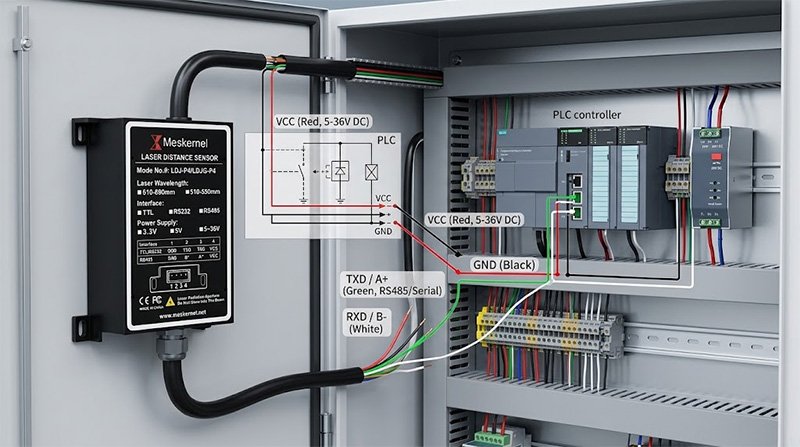
After completing the mechanical installation, connect the sensor according to the wiring diagram for the exact model.
Check the rated supply voltage, connector pinout, output type, and cable requirements before applying power. Sensors with similar appearances may have different electrical specifications, so never assume that their wiring configurations are interchangeable.
Depending on the model, a laser distance sensor may provide analog output, switching signals, serial communication, or an industrial interface. Confirm compatibility with the PLC, controller, or data acquisition system used in the application.
For PLC integration, verify the electrical compatibility of the sensor output and controller input. Analog outputs may require suitable input scaling, while serial communication may require the correct baud rate, device address, and communication settings.
Inspect all connections before energizing the system. Follow the manufacturer’s grounding, shielding, and cable-routing recommendations, particularly when the sensor operates near motors, drives, or other sources of electrical interference.
Correct electrical integration is an essential part of a Laser Distance Sensor Installation Guide because reliable optical measurement alone does not guarantee that the controller will receive valid data.
6. Configure and Verify Measurement Performance
Once the sensor is powered and connected, configure its measurement settings according to the application requirements. Depending on the model, these settings may include measurement range, sampling frequency, averaging, output scaling, and communication parameters.
Avoid changing several parameters simultaneously during troubleshooting. Adjust one setting at a time and record its effect on the readings.
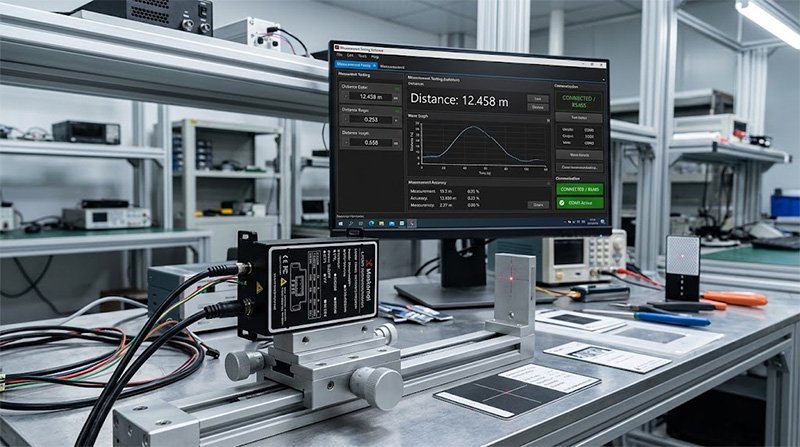
To verify the installation, place the target at several known distances within the operating range. Compare the sensor readings with a suitable reference instrument and record the results.
Next, test the sensor under representative operating conditions. If the target moves during production, evaluate performance while the machine is running rather than relying only on static measurements.
Focus on three indicators:
- الدقة: How closely do the readings match the reference distance?
- Repeatability: Does the sensor return consistent readings when measuring the same position repeatedly?
- Response: Can the sensor follow target movement at the required speed?
If readings fluctuate, inspect mounting stability, optical alignment, target reflectivity, electrical connections, and sensor settings before concluding that the device is defective.
A Laser Distance Sensor Correctly configured for the application should be evaluated across the actual measurement range, not just at one convenient test point.
7. Common Installation Mistakes to Avoid
Several avoidable mistakes can reduce measurement reliability, even when the selected sensor meets the application specifications.
Unstable mounting: A flexible bracket can introduce apparent distance changes. Reinforce the mounting structure and inspect fasteners.
Incorrect alignment: A laser beam that misses the target can cause intermittent readings. Check the entire target movement path.
Unsuitable target surfaces: Dark, glossy, or irregular materials may behave differently from standard test surfaces. Validate the actual material.
Incorrect wiring: Wrong supply voltage, pin assignments, or communication settings can prevent proper operation. Always consult the model-specific documentation.
Incomplete testing: A successful reading at one distance does not establish performance throughout the operating range. Test multiple positions under representative conditions.
Poor environmental protection: Dust, moisture, and mechanical impact may affect long-term operation. Confirm the sensor’s environmental ratings before installation.
Following these checks helps engineers install a laser distance sensor correctly and reduces unnecessary troubleshooting after production begins.
الخاتمة
A successful installation depends on the relationship between mechanical mounting, optical alignment, target characteristics, electrical integration, and commissioning tests. Engineers should evaluate each factor systematically rather than treating installation as a simple mounting task.
When you install a laser distance sensor correctly, you create the conditions needed for reliable measurement and consistent system operation. Selecting a suitable mounting position, verifying the target surface, following the correct wiring diagram, and testing performance at multiple distances can help prevent common problems.
For demanding industrial applications, always refer to the manufacturer’s specifications and validate the complete installation under actual operating conditions.
الأسئلة المتداولة
1. How do you install a laser distance sensor correctly?
Secure the sensor to a rigid bracket, maintain a clear optical path, align the beam with the target, connect the correct electrical interface, and verify readings at known distances.
2. Where should a laser distance sensor be mounted?
Choose a stable position with an unobstructed view of the target throughout its movement range. Consider vibration, working distance, surface angle, and environmental conditions.
3. Why are laser distance sensor readings unstable?
Common causes include loose mounting hardware, incorrect alignment, unsuitable target reflectivity, electrical interference, and inappropriate measurement settings.
4. Can a laser distance sensor measure dark objects?
Many models can measure dark objects, but performance depends on the sensor design, target reflectivity, working distance, and operating conditions. Test the actual material before deployment.
5. How can installation performance be verified?
Compare readings with a suitable reference at multiple known distances. Repeat measurements and test the sensor under representative operating conditions to evaluate accuracy, repeatability, and stability.